Worked example · read-only finances
How AI reviews my family finances without touching a penny.
My accounts are read and reviewed every day. Once a week, what's owed gets planned against what's actually there, and the bills come out in the order they need paying. Then it stops. No card, no bank logins, no way to send money anywhere. I still pay everything myself. What I stopped doing is forgetting.
The short version
-
It reads, once a day
One read-only pull of balances and transactions. Nothing else runs.
-
It works out where I stand
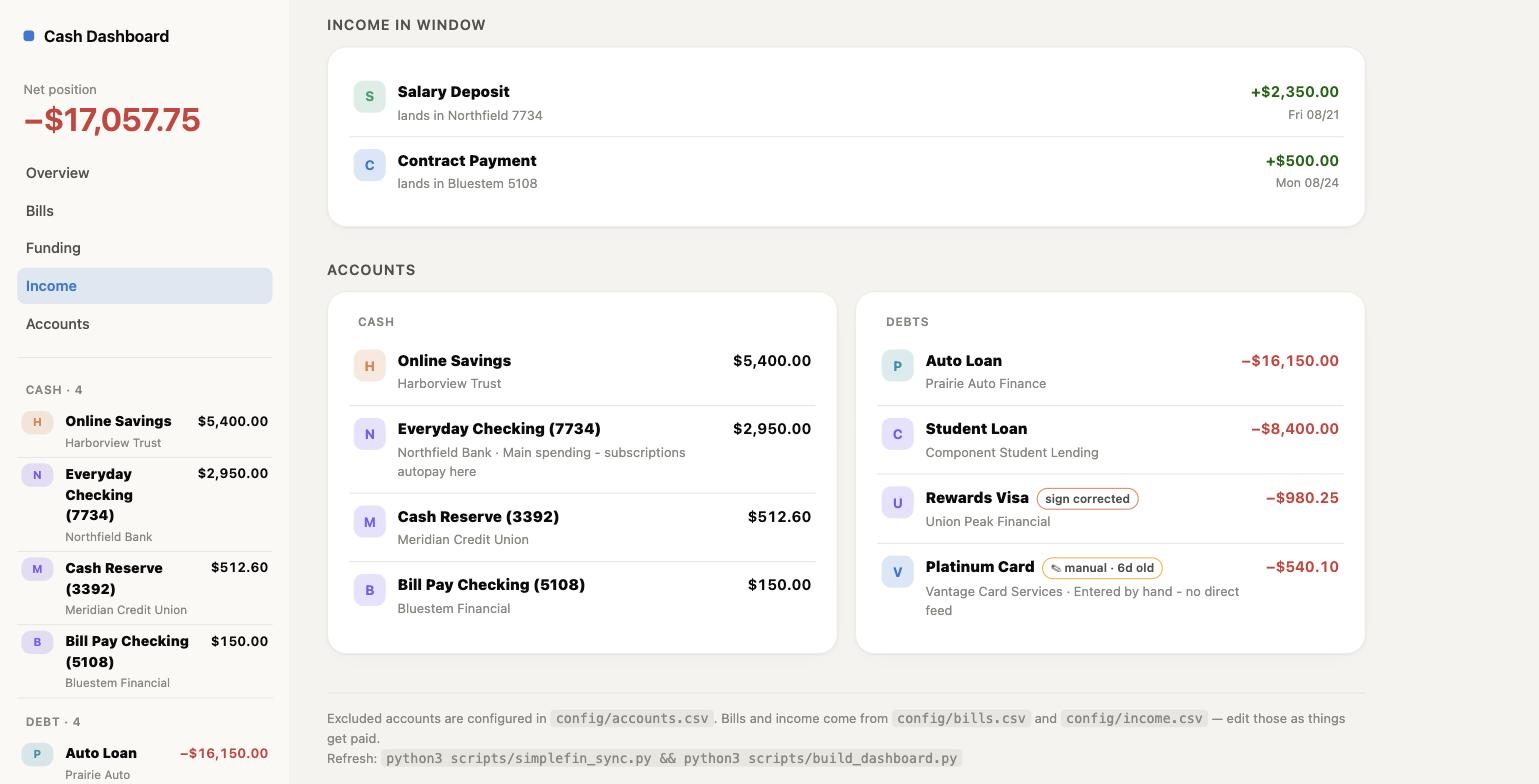
Cash that's actually spendable, and what's committed before the next payday.
-
I decide
What gets paid, and what waits. That stays human.
-
I move the money
In the bank's own app, by hand. The system never can.
What actually happensNine steps, and it can't do the last one.
-
It reads the accounts once a day
One scheduled look at balances and recent transactions. It can ask what's there. It has no way to ask for anything to be moved.
-
There are no bank logins on this machine
It holds no username or password for any bank, and it never will. What it has is permission to look, through a bank-trusted third party (think something like Stripe). That isn't a login and it can't become one.
-
The part I fill in myself
The feed only knows what's in the accounts. I decide which stay tracked, what's earmarked for something else, and what gets paid when it's due. Bills come from periodic email scans: the AI reads my inbox, updates the due dates, and keeps what it finds for next time.
-
It auto-verifies the feed for accuracy
With financial feeds, sometimes things can go wrong. It detects and fixes them. Before it becomes a problem for me.
-
Bills come out in the order they need paying
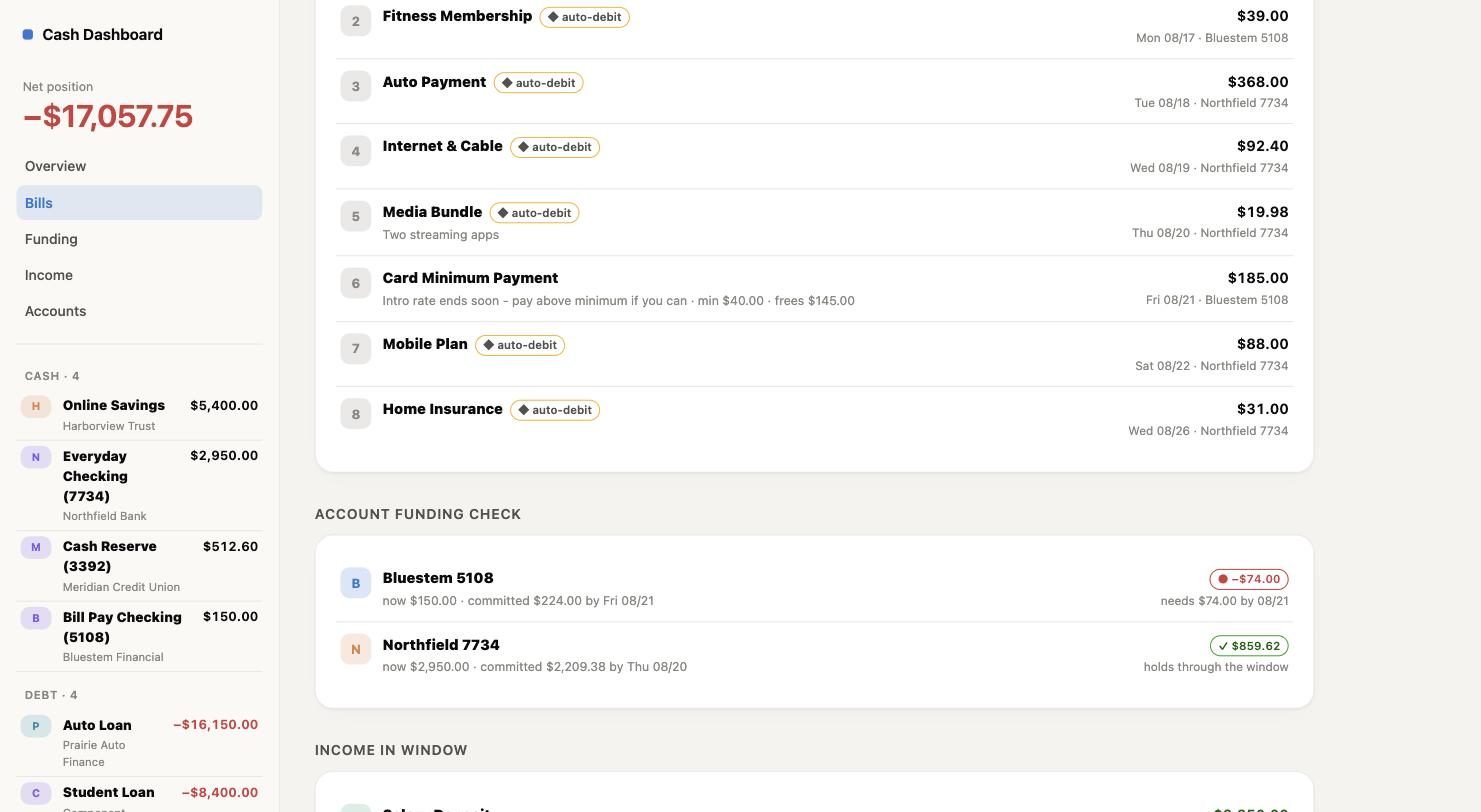
The due date sets the order, with anything overdue treated as needed today. I decide what actually gets paid, and I can move something up if it needs it.
Then it checks each account day by day instead of one total. A month can add up fine and still leave an account empty on the Tuesday, because the pay doesn't land until the Friday.
-
The AI reads the results, never the bank
By then the numbers are already worked out and saved. That's all it sees. Its job is the reading: what changed, what's about to go wrong, what a choice actually costs.
-
I decide, and I move the money
Which bill gets paid, which gets the minimum, which waits. Nothing here can pay anyone. Every payment is typed into the bank's own app by me, following the plan I made at the start of the week.
Which is also why the worst case has a floor. If someone got hold of what's on this machine, they'd learn what I owe. They could not pay themselves with it. Those are very different bad days, and it's worth knowing which one you're exposed to.
What it actually looks like
The same shape, in a business
Take the family out of it and this is the question every owner asks on a Sunday night: what have I actually got, what's going out before the money comes in, and which of those can wait. Most businesses answer it from memory and a banking app, one account at a time, which is exactly the method that hides the account due to empty on the Tuesday.
The mechanism transfers without changes. Read-only access to the accounts, your own list of what's owed and when, and a daily rebuild that puts it in payment order and walks it forward day by day. What doesn't transfer is authority. Nobody has to hand over a payment method to get the picture. You still press pay. That's the version worth having, and it's the only version I'd install in somebody else's business — the AI does the preparation; a person gives the go-ahead.
Interested in something like this? If there's something you keep doing by hand, let me know and I'll tell you what it would take to automate — the work moves to the AI, the accountability stays with you. And if it isn't worth building, or if something off the shelf would do it better, I'll tell you that instead.
Running a business and suspect there's more than one of these in your week? The diagnostic is built for exactly that.